ChippyCal features

Built to speed up your workflow so you can get on with the job.

ChippyCal is being built to make everyday carpenter calculations faster, clearer, and more useful. The goal is not to cram in random functions. The goal is to focus on the measurements, layout work, and job-site workflows that actually matter.

ChippyCal stud mode full screen

Instant metric ↔ imperial conversion

On real jobs you often end up working with people using different measurement systems. Some drawings are metric, some materials are imperial, and different trades often prefer different ways of working. ChippyCal shows both at the same time so you can move between them instantly without switching modes or doing conversions in your head.

Calculator

Live metric ↔ imperial conversion

Whether you're working old‑school imperial, modern metric, or constantly switching between both, ChippyCal keeps the numbers clear. Enter a value in either system and the other updates instantly so you can work the way you prefer without stopping to convert.

  • Instant metric to imperial conversion
  • Instant imperial to metric conversion
  • No buttons or mode switching
  • Clear side‑by‑side results
Geometry

Run, rise and diagonal

Useful for roof work, stairs, framing, and quick geometry checks when you want answers fast and do not want to fight a generic calculator.

  • Run and rise inputs
  • Diagonal calculations
  • Layout checking on the fly
  • Made for site-friendly use
Framing

Stud Mode / framing layout

One of the main ideas behind ChippyCal is making framing calculations quicker. Enter the studwork measurements, spacing, timber thickness, and layout choices and the app generates the full framing layout plus a complete cut list of every part so you can start cutting immediately.

  • Stud spacing support
  • Noggin layout planning
  • Total timber calculations
  • Full cut list with measurements
  • Sheet count support
Workflow

Cut lists and saved values

Keep useful measurements together instead of constantly retyping them. The aim is to make it easier to stay organised and move from numbers to cutting faster.

  • Simple cut list creation
  • Saved measurements
  • Cleaner repeated workflows
  • Built for speed over clutter

Stud Mode example

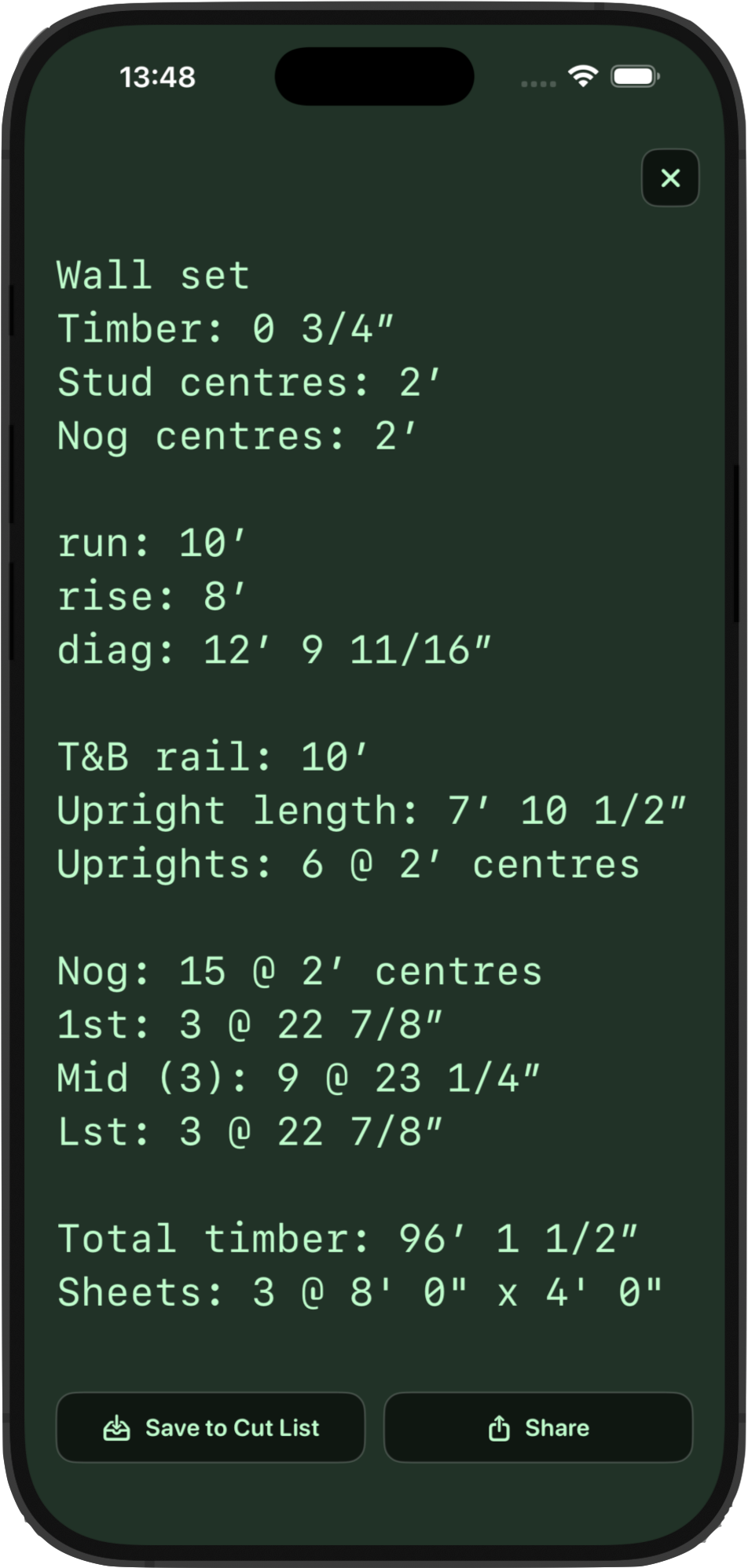
Stud Mode helps you quickly move from basic measurements to a full framing layout. Enter the run and rise, choose your stud and nog centres, and ChippyCal calculates the uprights, noggins, timber totals, and sheet counts automatically.

Example wall layout

In this example a 10 foot run and 8 foot rise wall is calculated with 2' stud centres and nog centres. The calculator returns the diagonal check, upright lengths, number of uprights, nog layout, and total timber required.

  • Run and rise wall dimensions
  • Automatic diagonal check
  • Stud and nog spacing calculations
  • Total timber requirement
  • Sheet count estimation